Dear Mac Fritzing Users,
With the advent of OS X10.7 and the soon-to-be-released Qt 4.8 (Qt is the underlying GUI framework for Fritzing), building for OS X10.4 and/or PPC will become an extra chore. How many of you out there still need Fritzing to support these platforms?
Thanks,
Comments from the old blog
- natm # 29. Okt. 2011, 21:52
Lots of schools still have labs full of PPC kit, I wonder how many of them are using Fritzing?
- tuxilein # 5. Nov. 2011, 12:04
I am still working on an old G4 MDD which is my primary workstation. Unlike maybe other users i am prepared to compile the software myself. I'll be glad to help with building and compiling for Debian/Linux-PPC and Mac OS X/PPC if needed.
The Fritzing Starter Kit has been our first attempt in late 2009 to try to generate funding for Fritzing by ourselves. We weren’t sure at all whether it would work out – luckily it turned out to be a big motivation for us and to continue along this way. The kit is very popular and has just crossed 1500 sales!
It’s great to see that our customers are coming from all over the world, from individuals, companies, universities, and secondary schools. Sometimes we get mails from our customers telling us how they are using the kits for classes, which is a great way for us to learn how to improve the kit as well as the Fritzing software.
If you haven’t noticed, the kit is also now available through our resellers tinkersoup and watterott, so that you can get some other gadgets with your order.
To commemorate this nice event, Stefan Hermann has built us a little sales clock that alerts everyone in the IXDS office about a new sale with a nice ka-chinggg (we’ll upload this project soon). Stefan has also been working on a kit update so that it now contains a piezo speaker, a temperature sensor, big resistors and a zener diode for a lot of new project ideas. The next thing will be an “extension kit”, stay tuned!
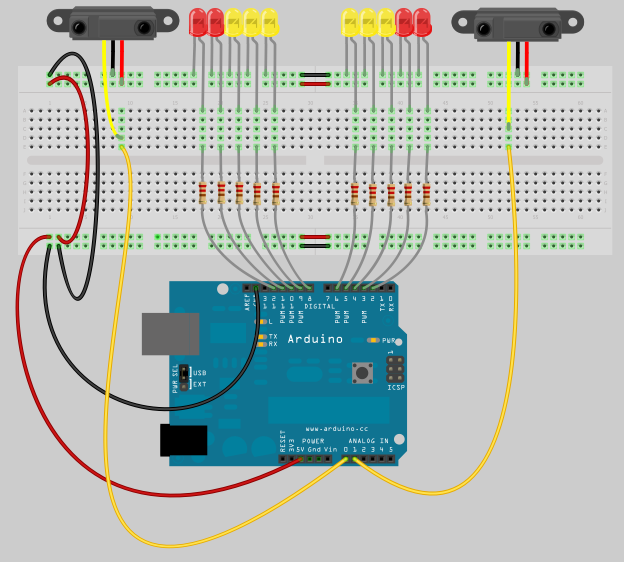
This is a screen shot from the Curvy Parking Assistant example sketch that comes with Fritzing 0.6.3.
What’s new is:
- wires can be curved, or can be straight and have bendpoints, or both
- many parts--such as resistors, capacitors, LEDs, and transistors--now have rubberband legs
- rubberband legs can be curved, or can be straight and have bendpoints, or both
These features are only available in breadboard view. The rest of this post will explain how to use them.
Wires
Let’s start with wires. As before, you can drag on each end of a wire, and it will stretch along with your mouse. You can drag out a bendpoint simply by mousing down somewhere on the middle of the wire and dragging. Or you can add a new bendpoint by double-clicking somewhere in the middle of the wire, or right-clicking to bring up the context menu, and selecting the appropriate option. To delete a bendpoint you can double-click it, or right-click to bring up the context menu.
Adding a curve to a wire is like dragging out a new bendpoint, except that you hold the control key down (Mac: command key down). How the curve bends depends upon where on the curve you drag it. To be specific, these are Bézier curves, which means that the curves are influenced by four points: the two endpoints, and two “control points”. As you drag on a curve, Fritzing will display the control points to give you a better sense of what’s happening. The image below is an example.
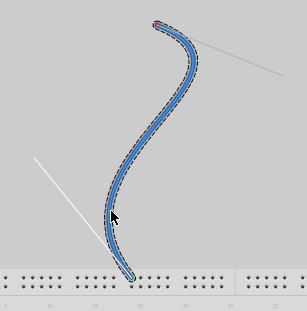
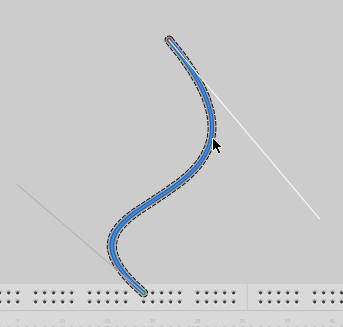
There is one control point at the end of the grey line and another control point at the end of the white line. Since you can only affect one control point at a time, the white line shows which one is active–in this case the point controlling the lower bend. The next image is the same curve, but now after mousing up from the lower bend and mousing down again and dragging the upper bend.
By the way, if you prefer curvy wires to straight ones, you can set that as the default in Preferences. So in that case, the normal drag behavior would produce curves, and to make a bendpoint, you would hold down the control key (Mac: command key).
Rubberband legs
A rubberband leg acts a lot like a wire with only one available end. If you have a part with rubberband legs, each leg can be manipulated independently of the others. Just as with a wire you can:
- drag the end of the leg to connect it to a distant connector
- drag out a new bendpoint
- create a new bendpoint by double-clicking or right-clicking and choosing a context menu option
- delete a bendpoint by double-clicking or choosing a context menu option
- drag out a curve by holding down the control key (Mac: command key) as you drag
Another feature of rubberband legs is that it is possible to move the body of a part without disconnecting its legs. For example, say you’ve dropped an LED onto a breadboard, and you want to change the position of the LED but leave it connected. In this case, hold down the alt key (Linux: meta key) as you drag the part. The legs will rubberband, staying attached to the breadboard as you drag the part body.
If you want to connect a rubberband leg to another part using a wire, then when you drag on the end of the leg, hold down the alt key (Linux: meta key).
That’s the rundown.
Enjoy,
– the Fritzing team
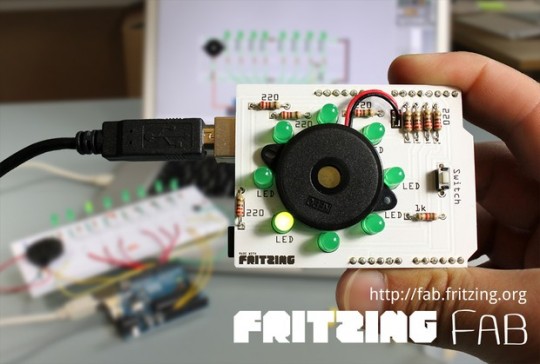
Even though it didn’t take us as long as DNF, we are aware that we were a bit optimistic with our previous announcements. But now it’s finally here: Fritzing Fab is open for business!
You can now go to fab.fritzing.org and order a PCB directly from your Fritzing sketch. (Just use your Fritzing.org account to log in.)
We hope that you are pleased with how easy the process is. No long lists of parameters – no worries. The prices are very low, too, and the more you order the cheaper it gets.
This new video should also give you a taste how quickly you can turn your breadboard sketch into a sweet custom PCB:
With the opening of Fab we have now come full circle. When you look closely at the photo above, you can see that it is the realization of the original vision sketch that you can still find on our front page. :)
Why did it take us so long? Besides some technical issues, this is a bit of a risky undertaking for an open-source project like us. Because PCB production is only efficient when producing large quantities, this will only work when enough people are ordering. As with the starter kits, all profit goes back into the further development of Fritzing.
So let’s keep the fingers crossed and give Fab a try.
Comments from the old blog:
- isnoop #2. Aug. 2011, 19:26This is excellent! I can't wait to use it in the coming months.
- Jürgen B #7. Aug. 2011, 20:03Hi, sorry, have i understand it right? An PCB with 100 x 160 mm will cost about 80,- Euro? I can not believe :-( I think, it will be much to expensive :-( Bey Juergen :-( https://www.loetseite.de
- André Knörig #9. Aug. 2011, 15:37Hi Jürgen, remember that this is the price for a single, individual PCB. And even though we are really small, this is actually still cheaper than the best known pooling PCB service in Europe -- and the profit goes back into Fritzing. We'd be happy to learn how to offer an even less expensive service, while still delivering the same quality.
- darius #7. Okt. 2011, 13:14I read in the FAQ, that you might accept Gerber or eagle files at some point if enough interest raises. Is there a specific place where I can cast my vote for this?
- André Knörig #23. Okt. 2011, 09:54Hi Darius, You just did. :)
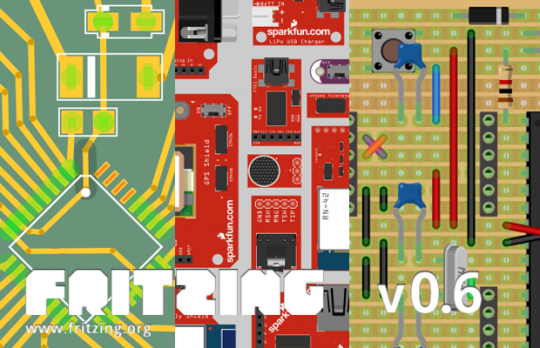
Introducing the new Fritzing version 0.6 (actually 0.6.2 by the time of writing). With thanks to all the people who purchased Fritzing Starter Kits, plus our donors, and SparkFun, we added several major new features:
- Support for SMD parts - You can now use those really tiny "Surface Mount" parts to make your PCB designs much smaller. In the parts inspector, you can simply change the 'package' of almost any part to 'SMD'.
- SparkFun parts library - With SparkFun's generous assistance, we were able to bring a new bin of 74 SparkFun products to Fritzing! You can find them by clicking the little folder icon under the parts bin, and then Open > SparkFun.
- Support for Stripboards - Not everyone works with breadboards, so by popular demand we added stripboards and perfboards. You can even cut and uncut strips! You can find the new boards right next to the breadboard, in our newly cleaned-up core parts bin.
We will discuss these features individually in future blog posts, but if they aren’t enough to whet your appetite, then have a look at our long list of new features, including a cleaned-up parts inspector, a document frame for schematics, text and graphics on copper, etc.
Plus we fixed a ton of bugs.
Download it here. Hope you like it!
– the Fritzing team
Comments from the old Blog
- Bret Comnes # 27. Juli 2011, 05:39
Wow, its like EagleCAD, but usable and free. Thanks!
- alkopop79 # 15. Aug. 2011, 13:03
It's everything I wanted: SMD and etchable mirrored export! Thanks!