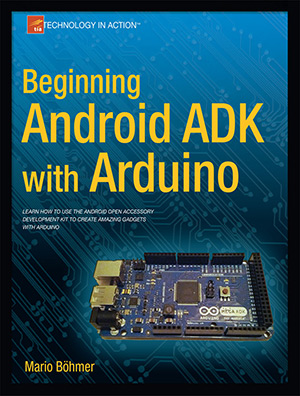
 Today, Mario Böhmer visited us and gave us a copy of his new book »Beginning Android ADK with Arduino« – it was impressive to see the possibilities with this dynamic duo.
The book gives an overview about the existing hardware development boards, explaining the software environments and guides you from outputs, inputs, sounds, light and temperature sensing to touch and motion.
The powerful combination of mobile devices and Arduino is very exciting and we are looking forward to new ideas, approaches, and outcomes.
Beginning Android ADK with Arduino
With the release of 0.7 we are dropping the Alpha in favor of a new, shiny Beta. Why do we think the new version deserves this? Because we finally cleaned up two longstanding architectural flaws. While you won’t notice any difference when you launch the new version, these changes will make your work with Fritzing clearer, cleaner, and easier, not to mention whiter, brighter, and more sparkly.
fzz is the new fz
First, we are deprecating the old .fz file format in favor of the .fzz file format (formerly known as the “shareable” format). You can still load your old .fz files, but Fritzing will only save out .fzz files. The .fzz format is just a zip file that contains a sketch file plus any custom parts used in that sketch. Essentially the new “Save” is the old “Save as Shareable”. This change eliminates a number of prompts when you open and save files, and makes sure that custom parts always travel with the sketch they belong to–which used to cause a lot of trouble.
When a sketch containing custom parts is loaded, the parts are placed into a temporary parts bin, which is only available while the sketch is open. You can move parts out of that bin (for example, into the My Parts bin) if you want to use the custom parts in other sketches.
all views are now created equal
Second, all three views now behave in the same way. There is no longer an implied workflow that suggests starting with the breadboard view and then moving on to schematics or PCB. In other words, the breadboard view is no longer the master–you can start working in any view and clean up the breadboard view later. In the old days this was very difficult because the breadboard view would get messy when you made changes in the other views.
This equality is achieved by making the breadboard view use ratsnest lines just like the other views. If you see a ratsnest line in a given view, it represents a connection you have made between parts in another view. If you always work in the same view, you will never see a ratsnest line. If you work across multiple views and see a ratnest line in a particular view, you can decide whether to lay out the connection in that view.
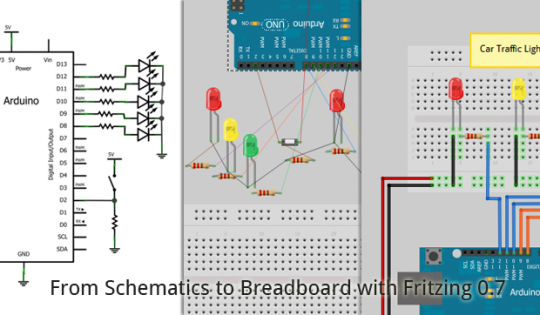
An important implication is that if you connect two parts by mistake–say by drawing a wire between them–and then delete the wire, the connection will be gone. But if those parts had also been connected in another view, when you delete the wire, the ratsnest line will be restored.
By contrast, deleting a ratsnest line means deleting the connection in all three views. Much of the time, this means that you will be deleting a wire between those parts. But it may mean a part gets disconnected from the breadboard in Breadboard view. Or it may mean that a wire between different parts get deleted, because the connection represented by the ratsnest line is not direct–for example, if the ratsnest line is between A and B, but the actual wires are drawn from A to C to B. So be a little careful when you delete ratsnest lines–it may be safer to switch to one of the other views and do the deletion there.
smoother
Everyone around Fritzing HQ is saying how much smoother and more predictable it is to work with Fritzing 0.7.0 compared to earlier versions. We hope you will feel the same way. Watch out for one of Stefan’s Killer Tip videos to show off some of the 0.7.0 improvements.
Enjoy,
Your Fritzing Team.
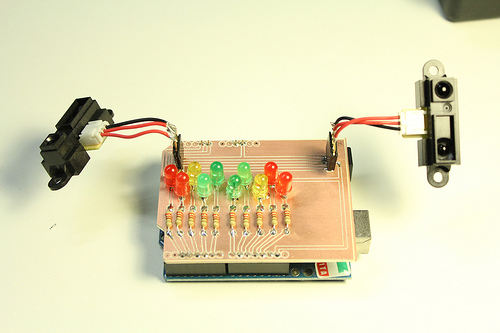
Our friends from FabLab Torino have created a wonderful tutorial (thanks to Federico Vanzati) on how you can prepare a Fritzing circuit for production with a CNC milling machine. It’s a relatively straightforward process using a vector software like Inkscape to convert the Fritzing DIY format to the “negative” format that the milling machine requires. The picture above shows the result. What’s nice is that they now also sourced the adequate DIY CNC machine. The Roland iModela is now available in the Arduino Store.
There have been attempts from others to mill Fritzing circuits: Checkout Don Roberts’ report, and also the tutorial from the FabLab Amersfoort (thanks to Peter Uithoven).
And then there’s still Fritzing Fab. :)
Nach der Veröffentlichung des Arduino Video Workshops auf Englisch kommt nun die deutschsprachige Synchronisation:
14 Folgen Einsteigerworkshop zum Thema Arduino und Elektronik.
Bitte weitersagen:
Arduino Lernen Episode 001 - Elektronische Grundlagen
Diese Episode klärt ein paar elektronische Grundlagen wie Strom und Spannung, Leistung und Arten von Stromkreisen.
Arduino Lernen Episode 002 – Arduino Überblick
Diese Episode stellt das Arduino-Board vor.
Arduino Lernen Episode 003 – Digital Out mit Blink
Diese Episode klärt, was ein digitales Signal ist und wie ein Programm auf das Arduino übertragen wird. Dazu gibt es einen Einstieg in die Programmierumgebung von Arduino.
Arduino Lernen Episode 004 – Digital Out mit SOS
Diese Episode erklärt for-Schleifen und Arrays.
Arduino Lernen Episode 005 – Breadboard Prototyping
Breadboards sind sehr praktisch um Ideen schnell umzusetzen. Diese Episode zeigt, wie du damit arbeiten kannst.
Arduino Lernen Episode 006 – Digital In mit einem Taster
Digitaler Input ist das Thema dieser Folge. Erklärt wird auch, wozu ein Dropdown Widerstand gut ist und wie eine if-Abfrage programmiert wird.
Arduino Lernen Episode 007 – Verstärkung mit einem Transistor
Oft benötigen wir Stromverstärkung. Wie das funktionieren kann, erkläre ich hier.
Arduino Lernen Episode 008 – Analog Out mit Fading
Der Unterschied zwischen digitalen und analogen Signalen wird geklärt, PWM vorgestellt und wir senden ein PWM Signal um eine LED zu dimmen.
Arduino Lernen Episode 009 – Analog In mit Servo und Pott
Diese Folge zeigt das Prinzip, analoge Sensoren auszulesen. Wir steuern einen Servo mit einem Potentiometer.
Arduino Lernen Episode 010 – Analog In mit Servo und LDR
Diese Folge zeigt, was ein Referenz-Widerstand ist und wie er benutzt wird, um analoge Sensoren auszulesen.
Arduino Lernen Episode 011 – Serielle Kommunikation
Datenübermittlung vom Arduino zum Computer.
Arduino Lernen Episode 012 – FIRMATA
Diese Episode stellt FIRMATA vor und zeigt, wie Arduino und Porcessing mit einander kommunizieren können.
Arduino Lernen Episode 013 – Platinenlayout mit Fritzing
Diese Episode zeigt, wie du mit Fritzing ein Platinenlayout erstellen kannst.
Arduino Lernen Episode 014 – Module
Diese sehr kurze Folge beschreibt eine gute Möglichkeit, den Funktionsumfang von Arduino zu erweitern.
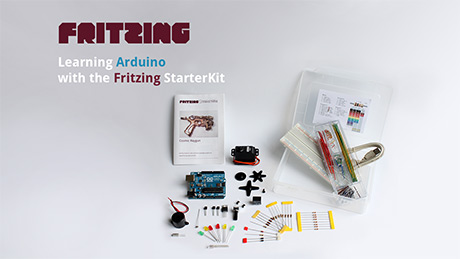
This years Fritzing gift is something very special: A complete Arduino Workshop!
14 Episodes of compressed knowledge of this famous Microcontroller for free and for you! Please share and comment.
We wish you all a Merry Christmas :)
- Learning Arduino Episode 001 – Electronic Basics
This episode will explain electronic basics like voltage, current, power and different circuits.
- Learning Arduino Episode 002 – Arduino introduction
This episode is introducing the Arduino board.
- Learning Arduino Episode 003 – Digital Out with Blink
This episode will show you, what a digital signal is an how you can transfer a program on the Arduino board. The Arduino programming environment is explained, too.
- Learning Arduino Episode 004 – Digital Out with SOS
This episodes shows the use of for-loops and arrays.
- Learning Arduino Episode 005 – Breadboard Prototyping
Breadboards are very useful to prototype ideas in short time. This episode will show, how to work with it.
- Learning Arduino Episode 006 – Digital In with a button
The digital input is the topic of this episode. The need of a drop down resistor is explained and in programming the if-condition.
- Learning Arduino Episode 007 – Amplification with a transistor
Amplification is needed very often. The main principle of it is shown here.
- Learning Arduino Episode 008 – Analog Out with Fading
The difference between digital and analog signals is explained, PWM introduced and we will send an analog signal out to fade a LED.
- Learning Arduino Episode 009 – Analog In with Servo and Knob
This episode will show the principle of sensing a resistor relation. A potentiometer and even a servo motor will be explained.
- Learning Arduino Episode 010 – Analog In with Servo and LDR
This episode will show you the use of a reference resistor when using analog sensors.
- Learning Arduino Episode 011 – Serial communication
Transmit signals from the Arduino to the computer.
- Learning Arduino Episode 012 – FIRMATA
This episode will show you how to work with Arduino and Processing using the FIRMATA library.
- Learning Arduino Episode 013 – PCB layout with Fritzing
In this episode I will show you, how to make a PCB out of your circuit using Fritzing.
- Learning Arduino Episode 014 – using modules
This episode will show you how to extend your Arduino.